


JPay
3.936.05K Reviews
App Specs
- Version
- 26.5.0
- Updated On
- License
- Free
- Downloads
- 5,000,000+
- Developer
- Jpay Mobile
- Categories
- Finance
- Platform
- Android, iOS
Screenshots

 Analysis by AppCompare
I approached JPay as a practical finance app with a very specific purpose: helping people send money and exchange messages, photos, and other communication with someone connected to the JPay service. That focus makes it different from a general banking app or a normal messaging platform. I would not install it expecting everyday budgeting, bill management, or a replacement for a bank account. I would install it when staying connected and handling a payment through JPay are part of the same situation.
The app is developed by Jpay Mobile and is free to download. It has been available since October 15, 2012, and its current Android version is 26.4.0, requiring Android 11 or later. Its Teen content rating is worth noticing because the app deals with real financial activity and personal communication, even though it is not presented as a conventional banking tool. With more than five million installs, it is clearly used by a substantial audience, while its average rating of 3.9 from roughly one hundred four thousand ratings suggests a useful but not universally smooth experience.
How JPay feels to use when clarity matters
I find that JPay’s most useful quality is how it brings money-related tasks and communication into one focused service, which can make a specific family routine easier to manage. In this section, I look at why that combination helps when details matter, and where careful checking remains essential. That distinction leads naturally to the practical question of how to keep each task clear.
Readability and navigation
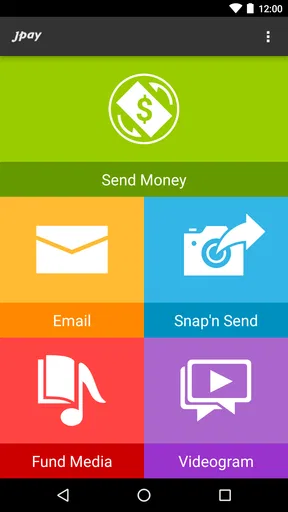
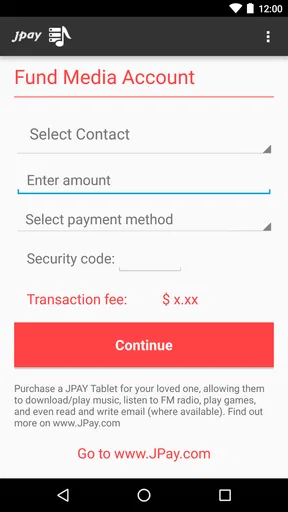
My first impression is that JPay works best when I treat it as a task-focused service rather than an app I casually browse. The main reasons to open it are usually clear: send money, write an email, receive a message, share a photo, or check the progress of something already initiated. That narrow purpose can be helpful for people who do not want to dig through a large collection of banking features.
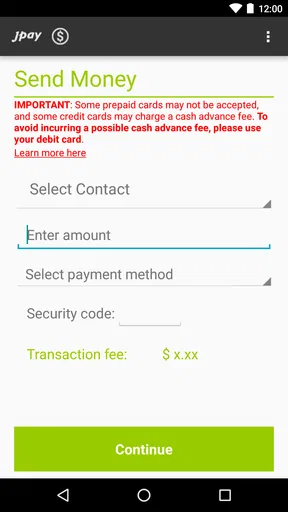
At the same time, a focused app still needs to make the difference between communication and financial actions unmistakable. When I am moving money, I want to know exactly which screen I am on, what action is pending, and whether I am reviewing a draft or completing a transaction. I recommend slowing down at confirmation points instead of tapping through quickly, especially if I am using the app in a hurry or on a smaller phone.
The most useful personal habit is to separate “send a message” tasks from “send money” tasks. I would open the relevant area, complete one job, and then return to the main screen before starting another. This reduces the chance of confusing a communication workflow with a payment workflow. It is a small adjustment, but it makes a meaningful difference when several family members or contacts are involved.
JPay’s long presence in the mobile market is reassuring in one limited sense: it is not a brand-new experiment that appeared without a track record. However, longevity does not automatically make every screen intuitive. The rating history indicates that many people find the app useful while others encounter friction, so I would judge it by the exact task I need rather than by the store score alone.
Worth Reading Before You Choose

EA SPORTS FC Mobile 26 Is a Bigger Football Game, but It Takes Time

Flipboard Shows What News Apps Must Do Beyond the Feed

Switching to Android Auto Means Rethinking Your Driving Routine

Google Calendar Makes a Crowded Week Easier to Manage

Ludo King Makes the Most of the Minutes Between Plans

Baby Panda World Brings Quick Play to Modern Phones, but Its Game Library Feels Busy
For readability, I would use the largest comfortable system text setting on my phone and keep the display uncluttered. I would also avoid relying on memory for names, amounts, or message recipients. Checking each field visually before sending is more reliable than assuming the app will prevent every mistake. This advice is especially important for users with reduced vision, reading fatigue, attention difficulties, or anyone who has to work through the app under stress.
Motor and sensory considerations
JPay can be useful for someone who wants to handle communication and payments from a phone instead of traveling to another location or depending on a desktop computer. That convenience matters for people with limited mobility, caregivers managing tasks on behalf of a relative, and users whose daily schedule makes in-person arrangements difficult.
Still, convenience should not be confused with effortless access. Financial actions require precise taps, careful reading, and enough time to review the result. A person with tremors, limited dexterity, or difficulty making accurate selections may find small controls and multi-step forms tiring. I would use the app while seated, with the phone supported, rather than trying to complete a payment while walking, carrying bags, or balancing other responsibilities.
A practical workaround is to prepare the information before opening the app. I would have the recipient details, the intended amount, and any message ready in a note or on paper, while taking care not to store sensitive information somewhere insecure. This reduces the number of times I need to switch between screens and lowers the physical effort involved in completing the process.
For sensory needs, the phone’s own display, contrast, text-size, and sound controls may be more important than anything inside JPay itself. Users who are sensitive to noise can keep the phone muted and rely on visual checks. Users with low vision may benefit from magnification or a larger display, but should still verify that magnified content does not hide a confirmation button or important wording. I would never assume that a visual change on the phone makes every part of a transaction equally easy to inspect.
People who are deaf or hard of hearing can approach the app primarily through its visual communication functions, including written messages and photos. That can be more convenient than a service that depends heavily on calls. However, a visual workflow still demands readable labels and clear status information. If an action is important, I would look for an on-screen confirmation rather than relying on a sound or vibration.
One useful trade-off is that keeping communication and money-related tasks together can reduce app switching, but it also places sensitive and emotionally important activities in one interface. Someone who becomes overwhelmed by mixed-purpose screens may prefer a simpler communication method for ordinary conversation and use JPay only when its specific payment or messaging function is necessary.
Situational access in everyday life
A realistic example is a family member who needs to send funds and a short message during the same week. Instead of using one service for a payment and another for communication, that person can use JPay for both purposes. I would first write the message, review the recipient, and then handle the payment as a separate step. Keeping those actions mentally distinct helps avoid sending the wrong content to the wrong person.
Another situation involves a caregiver who assists someone with limited mobility or low confidence using financial apps. JPay may make the process more manageable because the purpose is narrower than that of a full banking application. The caregiver can help read the screen, confirm the recipient, and check the final result without introducing unrelated account features. I would still make sure the account holder remains involved in reviewing important details rather than turning the process into an unchecked routine.
The app may also suit users who have reliable phone access but do not want to depend on a computer. That is an important form of situational access: a phone can be used from home, during a break, or while traveling between appointments. On the other hand, a phone is not automatically the best device for everyone. People who need a large screen, physical keyboard, or a more spacious layout may find a computer-based alternative easier when one is available.
For users with inconsistent connectivity, I would avoid starting a time-sensitive action at the last moment. A weak connection, a low battery, or an interrupted session can create uncertainty about whether a message or payment went through. After any interruption, I would check the app carefully before trying again. Repeating an action immediately is risky when the first attempt may already have been accepted.
Privacy is another situational concern. Messaging and photo sharing can be valuable, but I would avoid composing sensitive content in a crowded place where someone can read over my shoulder. Screen privacy is also relevant for caregivers, family members, and shared-device situations. A free app can still involve information that deserves careful handling, so I would use a device lock and avoid leaving an open conversation or payment screen visible.
What may still create barriers
The biggest barrier is specialization. JPay is not the right choice for someone looking for a complete personal-finance center. I would choose a normal banking app for checking account balances, managing ordinary transfers, reviewing broad spending activity, or handling standard banking tools. I would choose a general messaging app for everyday conversations with contacts who are not part of the JPay environment.
The second barrier is the seriousness of the actions. Sending money is not like sending a casual text. A user with reading difficulties, memory problems, or attention limitations may need another person to review the recipient and amount. That does not make the app unusable, but it means the safest workflow may include support from a trusted person. I would not recommend rushing through a payment simply because the interface appears familiar.
Users with older phones may also face a practical obstacle because the Android release requires version 11 or newer. Anyone considering installation should check the phone’s operating system first. If the device cannot meet that requirement, the problem is not a matter of changing a setting inside the app; a different device or access method would be necessary.
The Teen rating also tells me that families should think about supervision and context rather than handing the app to a younger user without discussion. Financial communication carries consequences, and photos or messages may contain personal information. I would explain what the app is for, which actions involve money, and when an adult should review a transaction.
Another limitation is that a store rating around four stars represents an average, not a promise about an individual experience. The app has roughly thirty-six thousand written reviews, so there is clearly a wide range of user experiences behind that number. I would test the basic navigation first, learn where confirmations appear, and avoid making a large or urgent transaction until I am comfortable with the process.
Accessibility also depends on the phone itself, the user’s abilities, and the specific task. A person may read messages comfortably but struggle with a payment form. Someone may manage the app visually but need help with precise tapping. Another user may find the mobile format convenient but prefer a larger screen for reviewing details. These differences are why I would describe JPay as potentially supportive in several contexts, not as a universally accessible solution.
Who should use it and who should look elsewhere
I think JPay is most suitable for people who already need its particular combination of money transfer and written or photo communication. It can be a sensible choice for a family member who wants one mobile place for those tasks, especially when traveling to handle them in person is difficult. It is also worth considering for users who prefer a phone-based workflow and are comfortable checking details carefully before confirming.
I would be more cautious about recommending it to someone who wants a simple messaging-only experience. Adding financial functions can make an app feel heavier than necessary when all the user wants is conversation. I would also steer a person toward a conventional financial institution’s app for broader banking needs, because JPay’s value comes from its specific service rather than from replacing every financial tool.
Before relying on it, I would answer a few practical questions for myself: Can my phone run Android 11 or later? Can I read and review the screens comfortably? Do I have enough time to confirm every payment? Will I use the app privately? Do I understand which tasks belong in JPay and which belong in my bank or regular messenger? If the answers are mostly yes, the app has a clearer case.
For someone assisting another user, I would create a repeatable routine: open the app, identify the intended contact, complete only one action, read the summary aloud or silently review it, and then confirm the result. This is more dependable than treating the app as a quick shortcut. It also gives users with cognitive, visual, or motor challenges a predictable sequence without claiming that the interface removes every difficulty.
My inclusive verdict
After looking at JPay through the lens of different abilities and real-life situations, I see a useful specialist app rather than a universal finance solution. Its combination of payments, emails, photos, and related communication can reduce the need to move between services, which is genuinely helpful for some families and caregivers. The free price removes one obvious obstacle to trying it, although the value still depends on whether its specific service matches the user’s needs.
I appreciate that a phone-based workflow can support people who cannot easily travel, who prefer written communication, or who need to manage a task away from a computer. I also appreciate the possibility of keeping a message and a payment within the same service. Those strengths are practical, not merely cosmetic.
My reservations are equally practical. Users need to review financial details carefully, manage privacy, and work around any motor, visual, cognitive, or connection-related difficulty. The app’s current Android requirement may exclude older devices, and its average rating shows that a smooth experience should not be assumed. I would begin with a low-pressure task, learn the navigation, and involve a trusted helper when accuracy matters.
My recommendation is conditional but positive: choose JPay when its dedicated payment-and-communication role fits your situation, and do not treat it as a replacement for a full banking app or a general messenger. For users who can read the screens, control the phone, and pause before confirming, it may be a convenient way to stay connected and handle JPay-related financial tasks. For anyone needing the simplest possible interface or broader banking access, another option will probably be a better fit.
Pros
- Convenient mobile access to account balances and transaction history.
- Supports sending money to eligible incarcerated individuals from a phone.
- Message delivery can be faster than traditional inmate correspondence.
- App notifications can help track payment or message status.
- Useful companion for users who already have a JPay account.
Cons
- Availability and features vary significantly by facility and state.
- Transaction and service fees can make frequent use expensive.
- Messages may be reviewed
- delayed
- or rejected by facility staff.
- Some services require the recipient to have an approved tablet or account.
- Customer support and issue resolution may take longer than expected.
FAQs for JPay
What is JPay used for?
JPay is a service designed to help people communicate with and support incarcerated individuals through features such as electronic messaging, video visitation in selected facilities, money transfers, and other correctional-services options. Availability depends on the facility and jurisdiction, so users should check whether the intended institution supports JPay and which services are enabled before creating an account or making a payment.
How do I create a JPay account and find an incarcerated person?
You generally create a JPay account using an email address, password, and basic personal information, then search for the incarcerated person by entering details such as their name, identification number, state, or facility. Search results and available services can vary by correctional institution. Carefully verify the person’s identity and facility before sending messages, funds, or other paid services.
Does JPay charge fees for messages, money transfers, or other services?
Yes, many JPay services involve fees, and the amount can vary according to the facility, state, payment method, transaction value, and service selected. Electronic messages may require stamps or credits, while money transfers and video visits can have separate charges. Review the total cost shown before confirming a transaction, including any applicable processing fees.
Can I send photos, videos, or attachments through JPay?
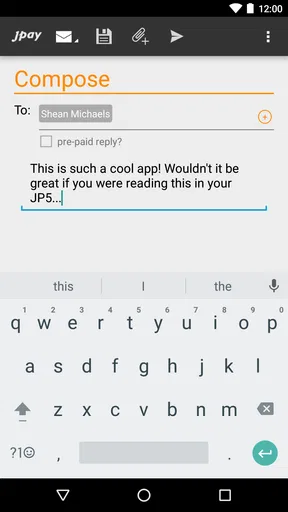
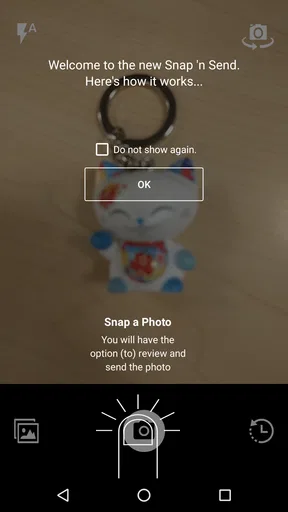
JPay may allow users to include photos and, in some locations, other approved attachments with electronic messages, but the exact options depend on the correctional facility. All content can be reviewed, restricted, or rejected under institutional rules. Files should comply with size, format, and content requirements, and sending an attachment does not guarantee that it will be delivered.
How long do JPay messages and payments take to arrive?
Delivery times depend on the facility’s review procedures, operating schedule, service availability, and the type of transaction. Messages may be delayed while being screened, and funds can require processing before they become available to the recipient. JPay should not be treated as an instant communication service. Check the transaction status in your account and contact support if an unusual delay occurs.


